How to Redirect your website to any page or external domain? Imprimir éste Artículo
1. Log into your cPanel account.
2. In the "Domains" section, click on "Redirects" Icon.

3. Under "Add Redirect" you should enter the following details and chose the appropriate option.
Type: Permanent (301) or Temporary (302)
http://(www.)?: Leave this as it is or should you just want to redirect a folder or a page, then enter the name of your folder or a full page path in the text box.
Redirects to: Where you want to redirect your current domain or a page.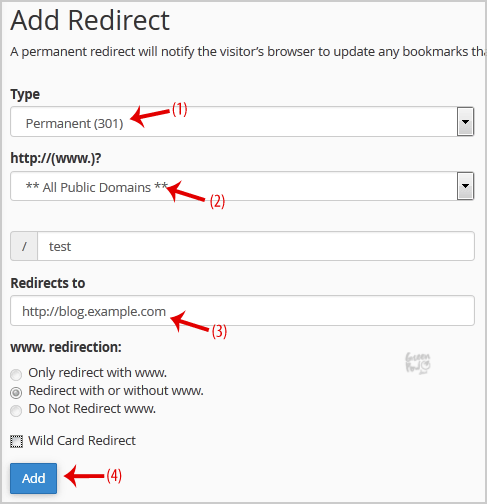
4. Click on the "Add" button.